A LITTLE GUIDANCE. A LOT OF MUSIC.
Your next chord.
Right here.
Ask for a chord in ChatGPT. See where your fingers go, hear how it sounds, and find another shape to try.
In preparation for OpenAI review. The plugin is not yet publicly available.
Meet your chord guide Simply GuitarExample
LESS GUESSING. MORE PLAYING.
From a question
to a chord.
A simple, visual reference that stays in the conversation.
- 01
Ask for a chord
Start with a question like
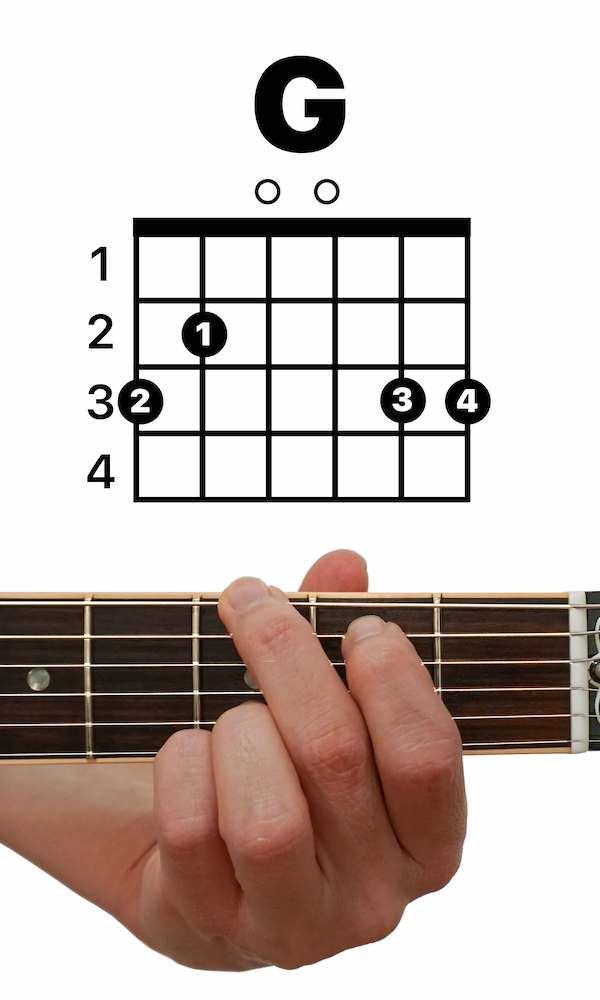
Show me how to play G major.
Sharp and flat names work too. - 02
See it. Hear it. Try it.
Follow the original chord diagram and hand-position photo. Play a synthesized strum, show the notes, or open the string-by-string guide when you need it.
- 03
Find your next shape
Browse the chord buttons or search by name. Filter by root, chord type, or shapes without a barre.
A FOCUSED CHORD LIBRARY
Small steps.
New possibilities.
57 chords, with original Simply Guitar diagrams and hand-position photos.
Built for standard six-string tuning, with one pictured right-handed voicing per chord. Use it as a reference while you practise.
The library does not include every chord, alternative fingerings, left-handed artwork, slash chords, or other instruments.
Show me D flat minor.
Find basic chords without a barre.
A little help along the way.
Questions, feedback or a technical issue? The Simply Guitar team is here to help.